Key takeaways
- Automation sends the emails you would otherwise repeat by hand, at the right moment for each person.
- Start with a welcome series; it reaches people when their interest is highest.
- Keep each automated email short with one clear action.
- Check your automations every few months so offers and links stay current.
You send the same emails again and again. A welcome note to new subscribers. A thank-you after a purchase. A reminder when it is time to book again. Automated email marketing sends those emails for you, at the right moment, to the right person. In this guide, you will learn which emails to automate first, how to set up a welcome series in an afternoon, and the mistakes that make automation feel robotic.
You do not need complex flowcharts. Most solo business owners get the biggest results from two or three simple automations.
What is automated email marketing?
Automated email marketing means emails that send themselves when something happens, like a new subscriber joining your list, or after a set wait. You write the emails once, set the timing, and the tool sends each one to every person at the right moment.
A campaign goes to everyone at the same time. An automation goes to each person on their own schedule. If someone subscribes on Monday and someone else on Friday, both get the same welcome series, each starting on their own sign-up day.
That is what makes automation so useful for a solo business. The work happens once. The results keep coming for as long as people keep joining your list.
Which emails should you automate first?
Start with three: a welcome email or short welcome series for new subscribers, a thank-you or follow-up after a purchase or visit, and a re-engagement email for people who have gone quiet. These cover the moments that matter most in a customer relationship.
1. The welcome series
New subscribers are the most interested people on your list. A welcome email that arrives within minutes, while they still remember signing up, is often the most-read email you will ever send. Our free welcome email template shows a proven structure you can adapt to any business.
2. The thank-you and review request
A few days after a purchase or appointment, thank the customer and ask for a short review. Happy customers are glad to help, and every review makes the next customer's decision easier.
3. The win-back email
Customers drift away for ordinary reasons: busy months, a move, forgetfulness. A friendly "we miss you" email with a small, time-limited offer brings some of them back.
How do you set up automated email marketing step by step?
Write your emails first, then build the automation: choose the trigger, add each email in order with a wait between them, turn it on and test it with your own address. Most simple automations take an afternoon to set up.
Here is the process in PostaraMail, and it looks similar in most tools:
- Write the emails. Use a template or the AI writer, and save each one.
- Create the automation. Give it a clear name, like "Welcome series".
- Choose the trigger. For a welcome series, choose "start for every new contact".
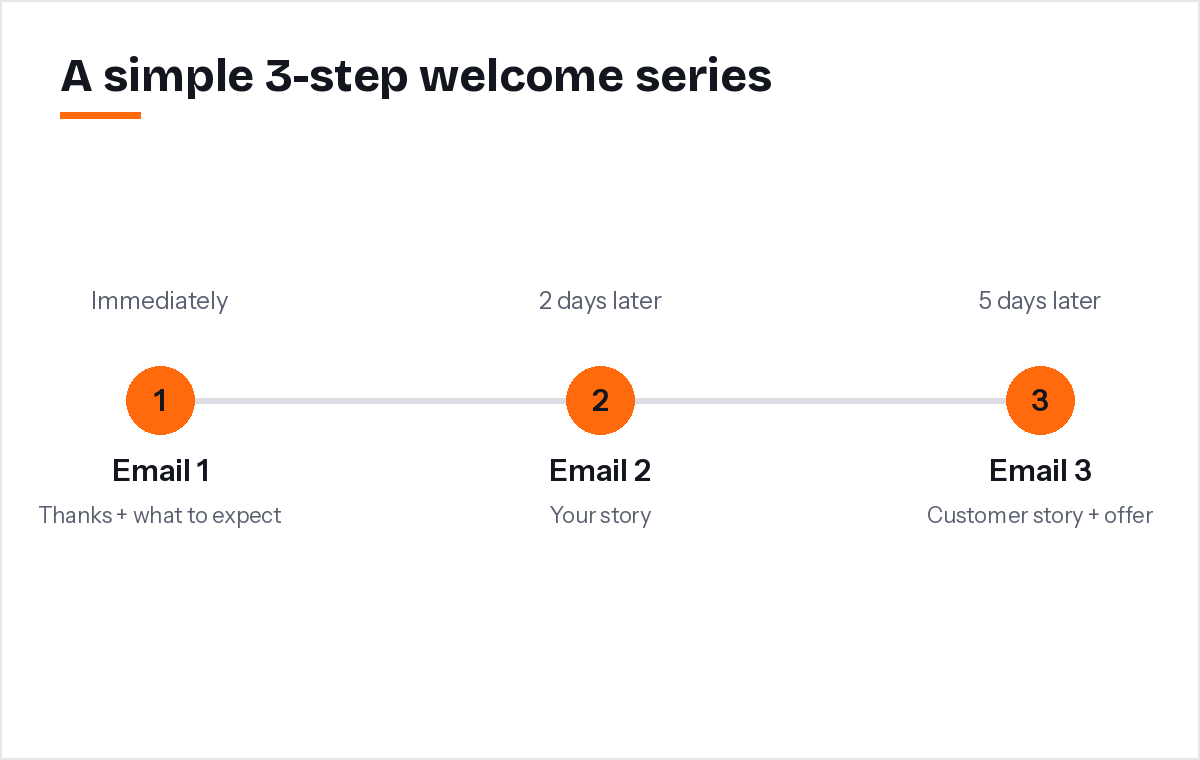
- Add the steps. Add each email with a wait: immediately, then two days, then five days.
- Turn it on and test. Add yourself as a contact and check each email arrives as expected.
You can see how this looks in practice on our email automation page.
What should each automated email say?
Give every automated email one job and one link. The first says hello and sets expectations, the next builds trust with your story or a customer quote, and the last makes a clear offer. Short emails with one action get more clicks than long emails with many.
A simple welcome series for most solo business owners:
- Email 1 (immediately): Thank you for joining, here is what to expect, here is one helpful link.
- Email 2 (two days later): Why you started the business and who you help.
- Email 3 (five days later): A customer story and a clear next step, like booking or a small first-order offer.
Write the way you speak. Use the subscriber's first name, sign off with your own name, and invite replies. Replies are a good sign for inbox providers and a great way to learn what customers want.
What mistakes make automation feel robotic?
The common mistakes are sending too many emails too fast, using stiff corporate language, forgetting to update old offers, and continuing to email people who have unsubscribed. Each one makes automation feel like spam instead of service.
Watch out for these:
- Too much, too soon. Five emails in five days overwhelms people. Leave space.
- Expired offers. A coupon that ended last season is worse than no coupon. Review your automations every few months.
- No way out. Every marketing email must include an unsubscribe link and your postal address, as the FTC's CAN-SPAM guide explains. Good tools stop the series automatically when someone unsubscribes.
- Ignoring inbox rules. Gmail expects bulk senders to keep spam complaints low and make unsubscribing easy (Google's sender guidelines). Relevant, well-timed emails are the best protection.
How do you measure automated email marketing results?
Look at each step on its own: opens, clicks and the action you wanted, like bookings or purchases. If one email performs much worse than the others, rewrite that one first. Small improvements to a welcome series pay off for every future subscriber.
Once a month, check three things:
- Which step has the lowest click rate? Improve its subject line or its offer.
- Where do people unsubscribe? If most leave after the same email, it may be too salesy or too soon.
- What happens after the series? Do finishers buy, book or reply? That is the real measure of success.
Having built automation into PostaraMail, my honest advice is to resist building ten automations on day one. One excellent welcome series beats five average ones, and it is far easier to improve.
Conclusion
Automation is how a solo business sends the right email at the right time without extra work. Start with a welcome series, add a thank-you and a win-back email, and keep each message short with one clear action. Review your steps every few months, and let the results tell you what to improve next. You can start with a free welcome email template and have your first automation running today.
Keep reading
- Email Newsletter Platforms: How to Start a Newsletter That Customers Read
- AI Email Marketing: A Practical Guide for Solo Business Owners in 2026
- Email marketing for freelancers
Ready to try it? Start free with PostaraMail: simple AI-powered email marketing built for solo business owners and freelancers.
Frequently asked questions
What is the first email I should automate?
The welcome email. It goes out the moment someone joins your list, when they are most interested in you. Thank them, tell them what to expect, and give them one next step, such as booking, browsing your best sellers or reading your most helpful guide.
How many emails should a welcome series have?
Three to five emails is a good starting point. Space them a day or a few days apart. Each email should have a single job: say hello, share your story, show social proof, then make an offer. Stop there and let your regular newsletter take over.
Will automated emails feel impersonal?
Not if you write them like a person. Use the subscriber's first name, write in your own voice, and sign off with your name. Invite replies. Many people never realise an email was automated if it is short, relevant and arrives at a sensible time.
Do automated emails need an unsubscribe link?
Yes. Automated marketing emails follow the same rules as any campaign. Every one needs a clear unsubscribe option and your business address. A good email tool adds both to every automated email and stops the series if someone unsubscribes.
How do I know if my automation is working?
Look at each step separately. Check how many people opened and clicked each email, and whether they took the action you wanted, such as booking or buying. If one step has far fewer clicks than the others, rewrite that email first.