Key takeaways
- AI is best at first drafts, subject line ideas and rewording; you stay the editor.
- Give the AI your goal, audience, tone and one call to action for better results.
- Always check facts, prices and dates before sending an AI-written email.
- Keep your own voice by editing the opening and the sign-off yourself.
Most solo business owners do not struggle with sending emails. They struggle with writing them. The blank page, the subject line, the "how do I start this?" moment. AI email marketing solves exactly that problem: you describe what you want to say, and an AI writes a first draft in seconds. In this guide, you will learn what AI does well, where it needs your help, and how to get emails that still sound like you.
You will also get simple prompts you can copy, so you can try this today.
What is AI email marketing?
AI email marketing means using artificial intelligence to help create, improve or organise your marketing emails. The most common use is writing: you give the AI a short brief, and it drafts a subject line and a full email that you edit before sending.
AI can help at several stages:
- Writing the first draft of a campaign or welcome email.
- Suggesting subject lines and preview text to test.
- Rewriting an email to be shorter, warmer or more professional.
- Brainstorming ideas for this month's newsletter.
What it cannot do is know your business. It does not know your prices, your opening hours or what happened in your shop last week. That knowledge is your job, and it is what makes an email worth reading.
How does AI help with email marketing day to day?
AI saves time on the parts of email that feel like work: getting started, finding the right words and trying different versions. A task that took an evening, like writing a monthly newsletter, can take fifteen minutes when AI writes the first draft.
A typical workflow looks like this:
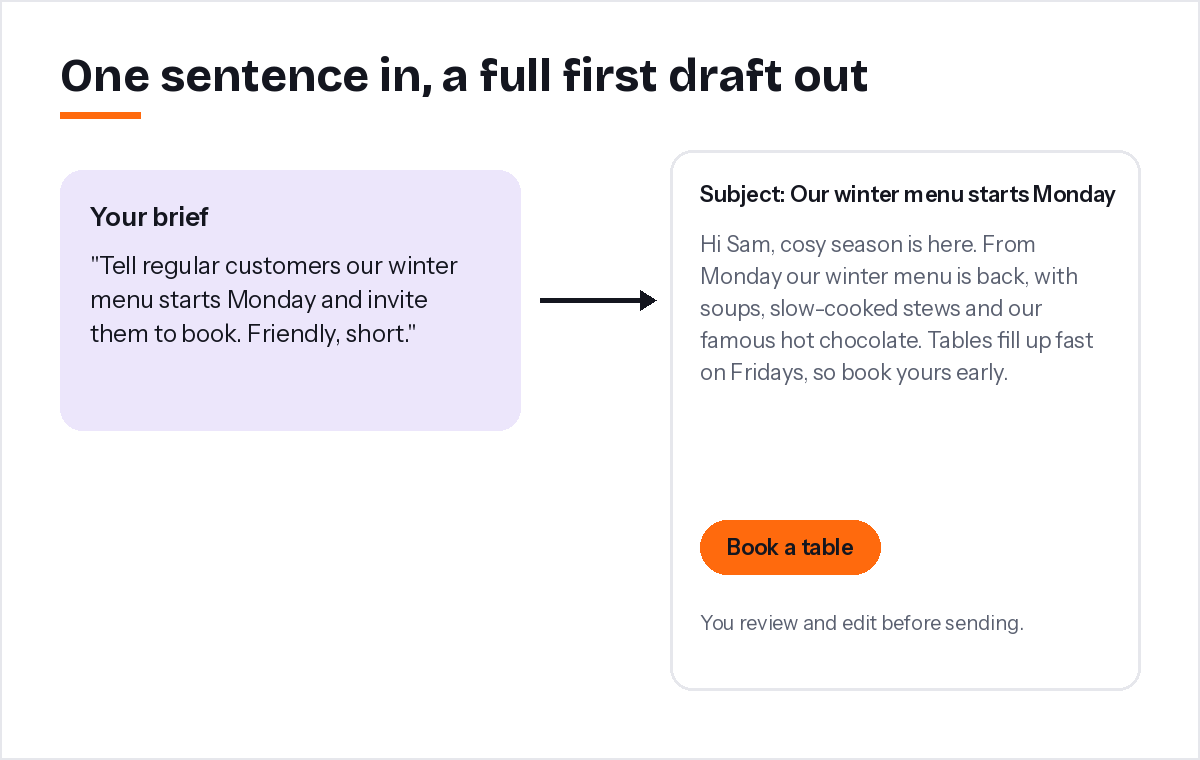
- Write one sentence about the email's goal, like "Tell regular customers our winter menu starts Monday and invite them to book".
- Pick a tone: friendly, professional, persuasive or casual.
- Read the draft and fix anything that is not true or not you.
- Send a test to yourself and read it on your phone.
In PostaraMail's AI email writer, this happens on one screen, and you can choose between Claude, GPT, Grok and DeepSeek for each draft.
How do you write good prompts for AI email marketing?
A good prompt includes four things: who the email is for, what you want to tell them, what you want them to do, and the tone. The more specific your details, the more useful the draft. Vague prompts produce vague emails.
Compare these two briefs:
- Weak: "Write a marketing email for my salon."
- Strong: "Write a short, friendly email to past clients who haven't booked in two months. Our new brow lamination treatment starts next week. Offer 15% off if they book before the end of the month. One button: Book now."
Here are three prompts you can copy and adjust:
- "Write a welcome email for new subscribers to [business]. Thank them, say we send one helpful email a month about [topic], and link to [best page]."
- "Write a reminder email for customers who are due for [service]. Explain why now is a good time and include one booking link."
- "Rewrite this email to be half as long and easier to read on a phone: [paste email]."
What are the limits of AI email marketing?
AI can invent facts, sound generic and miss your brand voice. It does not know your prices, deadlines or customers. Treat every AI draft as a starting point, and check names, numbers, dates and offers before sending.
Common problems and fixes:
- Made-up details. AI sometimes invents statistics or features. Delete anything you cannot confirm.
- Generic phrases. Lines like "In today's fast-paced world" add nothing. Cut them.
- Too long. Ask for a shorter version or delete the middle paragraph.
- Wrong tone. Ask for a rewrite in a different tone, or change the first and last lines yourself.
The legal rules do not change because AI wrote the email. Commercial emails still need honest content, your postal address and a clear way to opt out (FTC CAN-SPAM guide). And inbox providers still expect easy unsubscribing and low complaint rates (Google's email sender guidelines).
How do you keep your own voice with AI?
Edit the opening and the sign-off yourself, add one real detail from your business, and read the email aloud before sending. Those three habits turn a generic AI draft into an email your customers recognise as yours.
Some quick ways to make any draft sound like you:
- Start with something real: "We had the busiest Saturday of the year last week…"
- Use the words you use with customers, not marketing language.
- Sign off with your name, not "The Team".
- Invite replies: "Hit reply and tell me what you'd like to see next month."
Over time, save the drafts you liked best. They become examples you can paste into future prompts: "Write in the same style as this email."
How do you combine AI with email automation?
Use AI to write each email in a welcome series or follow-up sequence, review and save them, then add them to an automation. The AI saves writing time, and the automation saves sending time, so one afternoon of work keeps paying off.
A simple example:
- Ask the AI for a three-email welcome series for your business.
- Edit each email and save them.
- Add them to an automation with waits of zero, two and five days. Our guide to email automation shows how.
- Turn it on and add yourself as a test contact.
When I built the AI writer into PostaraMail, I made one rule: AI never sends anything by itself. Every draft is saved for you to review first. That keeps the speed of AI and the judgement of the person who knows the business.
Conclusion
AI is a writing assistant, not a replacement for you. Use it to beat the blank page, test subject lines and shorten long emails. Give it clear briefs, check every fact, and add your own voice before sending. Combine it with one good automation and you will spend less time on email and send more of it. You can try it free with one of our ready-made email templates.
Keep reading
- Automated Email Marketing: A Simple Setup Guide for Solo Business Owners
- 10 Email Design Best Practices for Solo Business Owners in 2026
- Email marketing for freelancers
Ready to try it? Start free with PostaraMail: simple AI-powered email marketing built for solo business owners and freelancers.
Frequently asked questions
Will AI-written emails sound robotic?
They can if you send them unedited. Give the AI clear details about your business and your reader, then change the opening line and sign-off to sound like you. A few personal touches, like a real example from your week, make the email feel human.
Can AI send emails for me automatically?
AI can write drafts, and your email tool can send emails automatically through automations. The safest approach is to review each AI draft before it goes into a campaign or automation. You stay responsible for what you send, so a quick human check is essential.
Is it okay to use AI for marketing emails?
Yes, as long as the email is honest and accurate. The same rules apply as for any marketing email: tell the truth, include your address and an unsubscribe link, and only email people who agreed to hear from you. Check any facts or offers the AI writes.
Which AI model is best for writing emails?
Different models have slightly different styles. Some write warmer copy, others more concise copy. Try two or three on the same brief and pick the style you like. PostaraMail lets you choose between Claude, GPT, Grok and DeepSeek for each draft.
What should I never let AI do in my emails?
Never let it invent facts, statistics, prices, deadlines, customer quotes or reviews. Those must come from you. Also avoid sending anything you have not read yourself. AI is a fast assistant, not a replacement for your judgement.