Key takeaways
- Design for phones first: one column, big text and buttons that are easy to tap.
- Give every email one main action and make it stand out.
- Use real photos, keep images light and always add alt text.
- Your logo, colours and address should look the same in every email.
Most people will look at your email for a few seconds on a small phone screen before deciding whether to read on. Good design makes those seconds count. These email design best practices will help your emails look professional, read easily on any device and get more clicks, without hiring a designer.
Each tip is simple enough to apply to your next email today.
Why do email design best practices matter?
Design decides whether people read your email or delete it. A clear layout, readable text and one obvious button help readers understand your message in seconds, especially on a phone. Poor design hides even the best offer.
Good design is not about decoration. It is about removing effort for the reader: where to look, what the email is about and what to do next. If your reader has to zoom, scroll sideways or hunt for the button, most will give up.
The 10 email design best practices
Design for mobile, use one column, keep a clear hierarchy, use readable fonts, keep images light, add alt text, use one main button, leave space, stay on brand and always test before sending. Together they make emails easy to read and act on.
1. Design for phones first
Assume your email will be read on a phone. Use a single column, text around 16 pixels and buttons big enough to tap with a thumb.
2. Use one column
Two or three columns look nice on desktop but get cramped on mobile. One column reads cleanly everywhere. Product cards can sit side by side on desktop as long as they stack on phones.
3. Create a clear hierarchy
Readers should see three things in order: a headline that says what the email is about, a short explanation, and a button. Everything else is supporting detail.
A quick way to check your hierarchy is the squint test. Look at your email on your phone and half-close your eyes. The headline and the button should still stand out. If everything looks the same size and weight, make the headline bigger and give the button a stronger colour.
4. Use readable fonts
Choose fonts that are available on most devices, like Arial, Helvetica or Georgia, and avoid tiny grey text.
5. Keep images light
Large images slow down loading. Compress photos, and use real photos of your products, team or space rather than generic stock images.
6. Always add alt text
Some email apps hide images until the reader allows them. Alt text describes each image so the email still makes sense, and it helps readers who use screen readers.
7. Use one main button
One clear action beats five competing links. Make the button colourful, with a short label like "Book now" or "Shop the sale".
8. Leave white space
Space around text and buttons makes an email feel calm and easy to read. Crowded emails feel like hard work.
9. Stay on brand
Use the same logo, colours and tone in every email so readers recognise you instantly. Setting a brand kit once in your tool saves time on every email.
10. Test before you send
Send a test to yourself and read it on your phone. Check every link, every image and the footer. If you can, also open it in a second email app, such as Gmail and Outlook, because each app displays emails slightly differently. Five minutes of testing can save you from sending a broken link to your whole list.
How do you apply email design best practices without a designer?
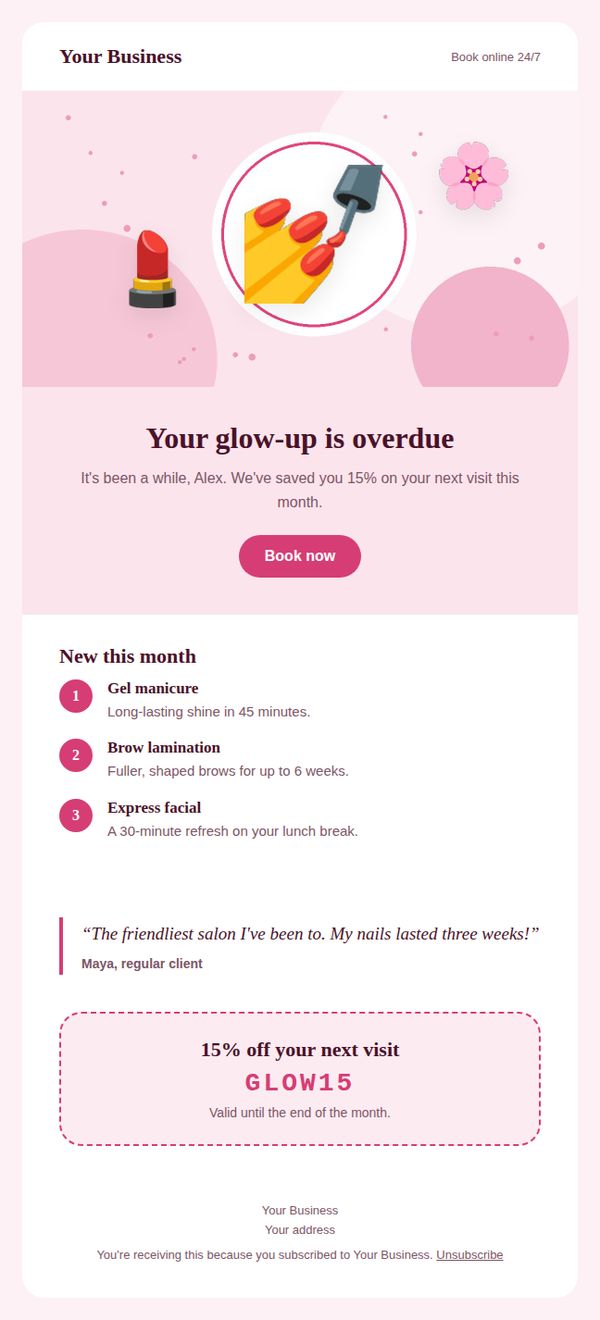
Start from a professionally designed template made for your type of business, then change only the text, photos and links. Templates already follow the layout rules, so you get a clean, mobile-friendly email without designing anything from scratch.
Our free email templates are built this way: one column on phones, one main button, and a footer with your address and unsubscribe link. You can browse designs for restaurants and cafés, salons, gyms, clinics and more, then fill them in with the PostaraMail editor.
What should always be in the email footer?
Every marketing email footer should include your business name, a valid postal address and a clear unsubscribe link. Adding your website and social links is helpful. These details build trust and are required by anti-spam rules.
The CAN-SPAM Act requires a valid physical postal address and a clear way to opt out in commercial emails (FTC compliance guide). Inbox providers also expect easy unsubscribing from bulk senders (Google's email sender guidelines). A good template includes these automatically.
Which design mistakes should you avoid?
Avoid putting all your text inside one big image, using tiny fonts, adding several competing buttons, using low-contrast colours and forgetting to test on mobile. These mistakes make emails harder to read and can hurt deliverability.
A few more to watch:
- Light grey text on a white background.
- Buttons that say "Click here" instead of what happens next.
- Huge, uncompressed photos that take seconds to load.
- Different logos or colours from one email to the next.
When I designed PostaraMail's templates, every one followed the same rule: one main button per email. It is the single design choice that makes the biggest difference for solo business owners, because it tells busy readers exactly what to do.
Conclusion
Great email design is simple: phone-first, one column, a clear headline, readable text, light images with alt text and one main button. Keep your branding consistent, include the footer essentials and test every email on your phone. Start from a good template, and your emails will look professional from the very first send.
Keep reading
- Email Newsletter Platforms: How to Start a Newsletter That Customers Read
- Email Blast Tools: How to Send a Mass Email the Right Way
- PostaraMail features
Ready to try it? Start free with PostaraMail: simple AI-powered email marketing built for solo business owners and freelancers.
Frequently asked questions
What is the best width for an email?
Around 600 pixels wide is the long-standing standard for email layouts. It fits comfortably in desktop email apps and scales down neatly on phones. Designed templates built for email handle this for you.
Should marketing emails use lots of images?
Use images to support the message, not replace it. Keep the key information, like the offer and the button, in real text, because some email apps block images by default. Always add alt text so the email still makes sense without pictures.
What fonts should I use in emails?
Stick to widely available fonts like Arial, Helvetica or Georgia, or use a web font with one of these as a fallback. Keep body text around 16 pixels so it is easy to read on a phone without zooming.
How many buttons should an email have?
One main button is best. You can repeat the same action lower down in a long email, but avoid several competing actions. When readers have to choose between five links, many choose none.
Do plain-text emails work better than designed emails?
Both work. Plain-text style emails feel personal and suit short updates and personal notes. Designed emails suit offers, product launches and newsletters with images. Many solo business owners use both, depending on the message.