Key takeaways
- Pick a platform for the emails you will send in the next 12 months, not for a someday list of features.
- The essentials are simple: an easy editor, automations, clear reports and good deliverability safeguards.
- Compare prices at your real list size, and check what happens to the price as your list grows.
- Moving platforms is easy with a CSV export, as long as you keep unsubscribed contacts out.
Most solo business owners know they should be emailing their customers. The hard part is picking a tool. There are dozens of email marketing platforms for solo business owners, and most of them look the same on their homepage: "easy", "powerful", "grow your audience". In this guide, you will learn what these tools actually do, which features matter, what you should pay, and how to switch without losing anyone on your list.
This is not a "top 10" list. Prices and features change too often for that. Instead, it gives you a simple way to judge any tool yourself, so you choose once and choose well.
What do email marketing platforms for solo business owners actually do?
An email marketing platform stores your contacts, helps you design and write emails, sends them in bulk without landing in spam, and shows you who opened and clicked. For a solo business, the best platform does those four jobs simply, so you spend minutes on email each week, not hours.
Think of the platform as four tools in one:
- An address book. It keeps your contacts, their sign-up date and whether they still want your emails.
- A writing desk. It gives you templates, an editor and, in newer tools, an AI writer that drafts the first version.
- A post office. It sends hundreds or thousands of emails at once, with the technical setup that helps them reach the inbox.
- A scoreboard. It shows opens, clicks and unsubscribes, so you know what worked.
A normal inbox like Gmail can do the first two badly and the last two not at all. Sending a newsletter to 300 people from your personal inbox is also the fastest way to get your address flagged as spam.
Which features matter most for a solo business?
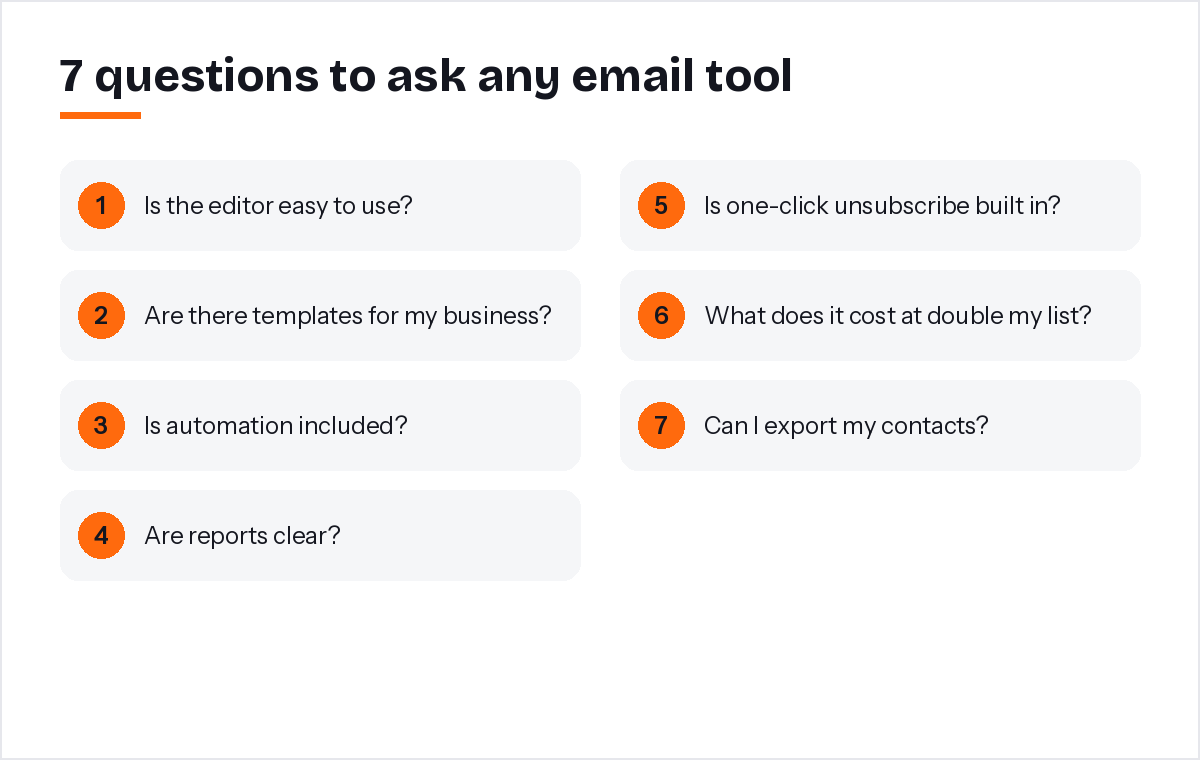
Four features matter most: an editor you enjoy using, at least one automation, clear reports, and built-in protection for your sender reputation. Everything else is a bonus. If a tool makes the basics hard, extra features will not save it.
Here is what to check, in order of importance.
An editor you will actually use
If writing an email feels like a chore, you will stop sending them. Look for templates made for your type of business and a simple way to change text, pictures and buttons. An AI writer that turns one sentence into a first draft removes the blank-page problem, which is where most solo business owners give up.
Automation for the emails you repeat
Some emails are the same for everyone: the welcome email, a thank-you after a purchase, a reminder to book again. Automation sends these for you at the right time. Start with one welcome series. You can learn more in our guide to email automation.
Reports in plain language
You do not need twenty charts. You need to know how many people opened, how many clicked, and which link they clicked. That is enough to decide what to send next month.
Deliverability safeguards
Since 2024, Gmail and Yahoo require bulk senders to authenticate their emails and offer one-click unsubscribe (Google's email sender guidelines; Yahoo's sender best practices). A good platform handles this for you and automatically removes addresses that bounce or complain.
How much should email marketing platforms for solo business owners cost?
Most solo business owners can start on a free plan and pay a modest monthly fee once their list passes a few hundred contacts. Prices usually rise with the number of subscribers, so always check the price at your current size and at double your current size.
Pricing pages can be confusing, so compare these three things side by side:
- What counts toward the limit. Some tools count every contact you store, others count only subscribed contacts, and some count emails sent per month.
- What is locked to higher plans. Automation, removing the tool's logo, or extra users are sometimes only on more expensive tiers.
- What happens when you grow. Put your list size into each pricing calculator, then double it. A tool that is cheap today can become expensive quickly.
For example, PostaraMail's pricing starts with a free plan and includes the AI writer and automations on every plan, so the price only changes when your list grows. Whatever you choose, avoid yearly contracts until you have sent at least a few campaigns and know the tool fits.
How do you compare tools fairly?
Sign up for the free plans of two or three tools and do the same task in each: import 20 contacts, write one email and send a test to yourself. The tool that feels easiest after that real test is usually the right one, whatever its feature list says.
Feature tables tell you what a tool can do. A hands-on test tells you what you will actually do with it. Give each tool the same 30-minute test:
- Import a small CSV of contacts and see how clear the process is.
- Create one email from a template that suits your business.
- Send a test to your own phone and read it there, because most emails are opened on mobile.
- Look for the unsubscribe link and your business address at the bottom.
Write down how long each step took. The numbers usually make the choice obvious.
How do you switch without losing subscribers?
Export your contacts from the old tool as a CSV file, import them into the new one, and rebuild your welcome email before you send anything else. Only move people who agreed to hear from you, and never re-add anyone who unsubscribed.
Switching sounds scary, but it is mostly a copy and paste job:
- Export subscribed contacts from your old tool as a CSV file.
- Import the file into the new tool. Check that first names came across correctly.
- Recreate your welcome email or series, ideally from a template.
- Send a short "we have a new look" email to warm up the new sender.
Keep your old account open for a month in case you need to check an old report.
What does a good first month look like?
A good first month is simple: set up one welcome email, send one useful campaign, and look at the clicks. Consistency matters more than perfection, so pick a day of the month and send something helpful every time.
Here is a plan that works for most solo business owners:
- Week 1: Import your list, add your logo and business address, and turn on a welcome email.
- Week 2: Send one campaign with a clear offer or a useful tip.
- Week 3: Look at which link got the most clicks. That tells you what your customers care about.
- Week 4: Plan next month's email around that topic.
From my own experience building PostaraMail for solo business owners, the owners who succeed with email are rarely the ones with the fanciest setup. They are the ones who send something useful on the same day every month.
Conclusion
Choosing an email tool does not have to take weeks. Focus on the essentials: an editor you like, one automation, clear reports and built-in deliverability protection. Compare prices at your real list size and at double it, and test two or three tools with the same small task. When you are ready, you can browse free email templates and send your first campaign today.
Keep reading
- What Is Email Marketing Software? A Beginner's Guide for 2026
- Affordable Email Marketing: How to Cut Costs Without Losing Results
- Email marketing for solo business owners
Ready to try it? Start free with PostaraMail: simple AI-powered email marketing built for solo business owners and freelancers.
Frequently asked questions
What is the easiest email marketing platform for a solo business?
The easiest platform is the one you will actually use every month. Look for ready-made templates, a simple editor and help writing the first draft. If you can create and send a test email in under 15 minutes on the free plan, it is a good sign the tool fits your business.
How much should a solo business pay for email marketing?
Most small lists can start free and move to a paid plan once they pass a few hundred contacts. Compare plans at your real list size, and check the price at double that size, because pricing usually rises with subscribers. Avoid long contracts until you know the tool works for you.
Do I need automation as a solo business?
Yes, at least one. A welcome email that goes out the moment someone subscribes does more work than almost any other email. You write it once and it keeps working. More complex automations can wait until you know what your customers respond to.
Can I switch email platforms later?
Yes. Export your contacts as a CSV file, import them into the new tool, and rebuild your welcome email. Only move people who agreed to hear from you, and keep unsubscribed and bounced addresses out so they are never emailed again.
Is email still worth it for solo business owners?
Email is one of the few channels you own. Social media reach can change overnight, but your list stays with you. For businesses that rely on repeat customers, bookings or referrals, a short regular email is one of the most reliable ways to stay remembered.